GifWidget Pro
Momo appsPersonalization
4.189.00 Reviews
- Version
- Varies With Device
- Installs
- 10.00K
- Age Rating
- Everyone
Screenshots
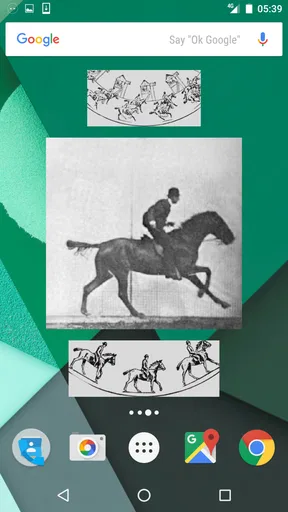
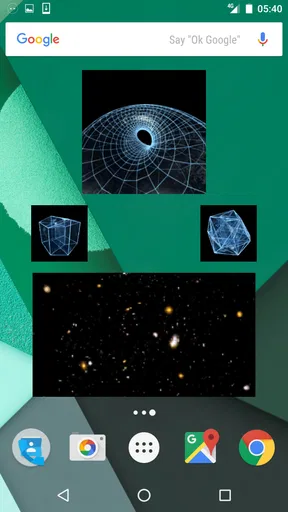
Our Review of GifWidget Pro
 Analysis by Appyee
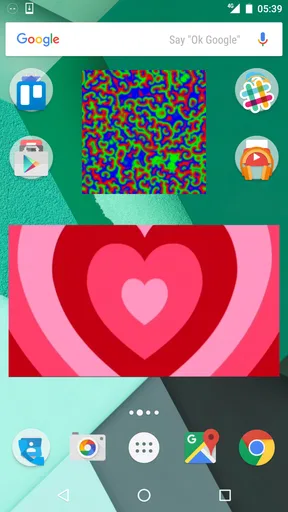
I like home-screen tools that do one small thing clearly, and GifWidget Pro takes that approach. It puts a GIF on an Android home screen so the image is visible without opening a separate app. That sounds simple, but the value depends on whether a constantly changing visual is useful to you or merely adds clutter. After spending time with it, I see this as a focused personalization app rather than a general wallpaper replacement or a full animation editor.
The app comes from Momo apps and is listed for Everyone, which makes its basic idea easy to understand for a wide audience. It is a paid download at $2.49, so the decision is not really about discovering a large toolkit. It is about deciding whether a dedicated GIF widget is worth paying for instead of using a static wallpaper, a normal image widget, or a shortcut to a gallery or social app. For the right person, the directness is the main appeal.
How I would decide whether it belongs on your home screen
My first question would be practical: do you have one GIF you genuinely want to see throughout the day? That could be a looping animation of a pet, a family moment, a favorite character, a calming visual, or a small reminder that feels more personal than a plain photograph. If the answer is yes, this app has a clear purpose. If you only want to browse animated images occasionally, opening a gallery or messaging app may be more sensible.
The second question is how much home-screen space you are willing to give up. A widget needs room, and animated content is more visually prominent than a still image. I found that the best experience comes from treating it as a deliberate focal point rather than squeezing it beside every shortcut. A less crowded page lets the GIF feel like a personal detail instead of noise competing with notifications, icons, and other widgets.
The third decision point is convenience. A normal image can sit on a wallpaper indefinitely, while a GIF widget keeps the animation separate from the rest of the background. That separation is useful when you want to change the animated image without redesigning the whole home screen. It also means you can keep a clean wallpaper and reserve one area for motion, which is a more controlled setup than covering the entire display with a live background.
I would also consider how often you change your visual theme. GifWidget Pro makes the most sense for someone who enjoys curating a home screen, not someone who sets it once and forgets it. The app’s appeal is in choosing an image that feels right for the current mood or season. If customization is something you revisit, a small dedicated widget can be more satisfying than a static background that quickly becomes invisible.
A focused widget instead of a complete personalization suite
In the wider personalization category, many tools try to handle wallpapers, icon packs, launchers, themes, clocks, and decorative panels at the same time. This app is narrower. I see that as both its strength and its limitation. There are fewer layers to learn, but also fewer ways to build a complete visual system around the animation.
That narrow focus makes the product easier to judge. You do not need it because you want “more customization” in the abstract. You need it because a GIF on the home screen is the specific result you want. This is a useful distinction when comparing it with large customization suites: those suites may offer more overall, but they can also make a single visual change feel like part of a much bigger project.
The app has an average rating of 4.1 from around 500 ratings, with roughly 90 written reviews. I read that as a sign of a generally positive but fairly specialized tool rather than a universal must-have. Its install base is over 10K, which also fits the impression of a niche utility with a clear audience. Those figures do not replace personal testing, but they match what I experienced: this is a small-purpose app that can be very appealing when its purpose matches your habits.
Where the simple idea works especially well
The strongest use case is a personal memory that benefits from movement. A short family clip or a pet doing something funny often feels more alive as a loop than as a single frame. Placing it on the home screen turns an ordinary unlock into a small moment of recognition. I would not use it for every image, but for one meaningful animation the format feels more intimate than opening a photo album.
It can also work as a visual mood cue. A slow, pleasant loop beside a minimal set of icons can make a phone feel calmer, while a playful animation can give a more energetic page some character. The important trick is restraint: one strong GIF is usually more effective than several competing animated elements. The widget works best when the rest of the layout gives it breathing room.
Another useful workflow is separating personal and functional pages. I would keep a practical first page for calendar, messages, and other daily tools, then place the GIF on a second page where the phone feels more personal. That arrangement avoids sacrificing quick access to essential shortcuts while still giving the animation a visible home. It is a small organizational choice, but it helps solve the main trade-off between decoration and efficiency.
For people who use a phone as a small display at a desk, the widget can be more noticeable than a static picture. A looping animation can act as a visual accent while the device is idle. I would be careful with distracting or rapidly changing content, especially in a work setting, but a restrained loop can make a spare device feel less anonymous without turning it into a full digital frame.
Practical habits that make the widget feel better
My first tip is to choose the GIF before adjusting the layout. Animated images vary widely in brightness, contrast, and visual density. A dark loop may disappear against a dark wallpaper, while a bright one can dominate the whole page. Selecting the image first lets you build the surrounding home screen around its actual appearance instead of trying to correct a poor match later.
My second tip is to avoid judging the widget while every icon is still in its default position. Move the most-used shortcuts away from the animation and leave a clear visual border around it. This is not about making the screen look like a showroom; it is about preventing accidental taps and making the GIF readable at a glance. The widget’s charm is reduced when it is buried under a crowded grid.
A third insight is to use different GIF styles for different pages. A personal loop works well on a relaxed second page, while a simple, low-motion animation is less distracting near productivity tools. This lets you keep the feature without allowing it to interfere with the parts of the phone you use for quick tasks. The app itself is straightforward, but the surrounding layout determines whether it feels useful or ornamental.
I would also keep a still version of an important image available elsewhere. A GIF is enjoyable as a display, but it is not always the best format for sharing, editing, or quickly checking a particular frame. Keeping the original in your normal photo storage avoids turning the widget into the only place where that memory is easy to see. This is a small bit of housekeeping that prevents the personalization feature from becoming a storage habit.
What may feel limited compared with broader alternatives
The main limitation is scope. If you want to create animations, apply effects, organize a large collection, or manage an entire theme, this is not the category of tool I would choose. A dedicated GIF editor is better for making the content, and a launcher or wallpaper suite is better for changing the overall identity of a phone. GifWidget Pro is for displaying a chosen animation, not for replacing those other jobs.
It also may not suit someone who prefers a quiet, information-first home screen. Motion naturally draws the eye, even when the animation is small. If you rely on your first page for rapid scanning, an animated element can become a distraction rather than a welcome detail. In that situation, a static photo widget or plain wallpaper is the more disciplined choice.
There is a difference between having a GIF available and having a GIF that looks good in a widget-sized space. Some animations depend on large detail, fast movement, or a wide frame. Shrinking them can make the subject difficult to read, and cropping can change the composition. I would choose a loop with one clear subject and a simple background rather than an elaborate scene with several things happening at once.
People who change phones or home-screen layouts frequently should think about the setup effort involved in their own routine. Any widget-based arrangement becomes part of the home-screen design, so moving to a new layout may require recreating that placement. For someone who enjoys experimenting, that is minor. For someone who wants a completely frictionless transition between devices, a wallpaper-based solution may be easier to carry over.
How it compares with the usual choices
A static wallpaper is the simplest alternative. It uses no dedicated widget space and creates a consistent background, which is ideal for a clean, low-distraction phone. The trade-off is that changing the image can affect the entire visual layout, and a still picture cannot provide the small sense of life that makes a GIF appealing. I would choose the wallpaper when simplicity matters more than animation.
A standard photo widget is closer in layout but different in feeling. It can display a meaningful image without movement, making it easier to read and less demanding visually. GifWidget Pro wins when the loop itself is important, especially for a short moment that loses some personality as a still frame. The photo widget wins when you want a memory present but quiet.
A live wallpaper can make motion cover much more of the screen, so it is a better fit for someone who wants an immersive animated background. The downside is that it can compete with icons everywhere, rather than giving the animation one defined area. I prefer the widget approach when I want control over where the motion appears and when I want the rest of the wallpaper to remain calm.
A launcher or full theme package may be the better investment for users who want coordinated icons, layouts, gestures, and backgrounds. Those tools can transform the whole phone, while this app makes one targeted change. The comparison is not about which product is more powerful; it is about whether you want a complete redesign or one personal animated detail.
The real cost of switching to this kind of setup
The purchase price is $2.49, so the financial commitment is modest, but the more important cost is attention. You need to choose an appropriate GIF, place the widget carefully, and decide whether the animation belongs on the first page or somewhere less central. That process is worthwhile if you enjoy personalizing the phone, but unnecessary if you only want a picture visible during occasional browsing.
There is also a visual cost. A home screen has limited space, and every widget competes with shortcuts or information panels. Adding an animated element means giving up some of that space. I would not remove a useful calendar or navigation shortcut just to fit a decorative loop. Instead, I would test it on a secondary page first and move it forward only if it improves the daily experience.
The benefit of switching from a static setup is flexibility. The animation can have its own place, so you can refresh that part of the screen without rebuilding the entire background. The benefit of staying with a static setup is reliability of attention: nothing moves unless you deliberately interact with it. Your choice should follow your tolerance for visual activity, not just your interest in GIFs.
Because the app is paid, I would make the decision before downloading by identifying a specific image and a specific location for it. That avoids buying a tool for a vague idea of customization. If you can already picture the loop, the page, and the reason you want it there, the purchase feels considered. If you are simply browsing for something new to install, a broader personalization app may give you more room to explore.
My recommendation for different kinds of users
I recommend GifWidget Pro to someone who wants one favorite animation visible on an Android home screen and prefers a dedicated, uncomplicated solution. It is especially appealing for personal memories, playful visual accents, and users who enjoy arranging a phone page with intention. The app’s focused design is its best quality: it does not ask you to rebuild the entire device just to give one GIF a place.
I would skip it if your priority is maximum battery-conscious simplicity, a completely still interface, or a full theme makeover. I would also look elsewhere if your main goal is creating and editing GIFs rather than displaying one. An editor, photo widget, live wallpaper, or launcher may be a better match depending on that specific need.
For my own setup, I would place a carefully chosen loop on a secondary page, keep the main page functional, and use a simple animation with a clear subject. That arrangement captures the fun without letting motion take over the phone. It also makes the feature easy to remove if the novelty fades, which is important for any decorative customization.
My bottom line is simple: this is worth considering when a GIF is the destination, not merely a feature you might try. Momo apps has made a narrowly defined personalization tool, and its value comes from how well that narrow idea fits your routine. At $2.49, I think it is a reasonable choice for someone with a specific animated image in mind, while users seeking a broader or quieter home-screen solution should choose a different category instead.
Verdict
Strengths of GifWidget Pro
- Displays animated GIFs directly on your home screen
- Supports multiple widget sizes for flexible layouts
- Quick access to favorite GIFs without opening the app
- Useful for personalizing otherwise static home screens
- Pro version offers a focused, ad-free widget experience
Limitations of GifWidget Pro
- Animated widgets may use more battery than static widgets
- GIF quality can vary depending on the source file
- Some launchers may limit widget refresh behavior
- Large GIFs can consume noticeable storage and memory
- Setup may require extra permissions or manual widget configuration
Similar Picks in This Category
View All
Microsoft SwiftKey AI Keyboard
SwiftKey4.3

Wallpapers
Google LLC4.1

Zedge™ Wallpapers & Ringtones
Zedge4.7

Yandex Browser with Alice AI
Direct Cursus Computer Systems Trading LLC4.3

Ringtone Maker:create ringtone
Big Bang Inc.4.7

Fonts Keyboard
Fonts Keyboard3.9
Frequently Asked Questions
What is GifWidget Pro and what does it do?
GifWidget Pro is an Android customization app designed to place animated GIFs directly on your home screen as widgets. After selecting a GIF from your device or a supported source, you can add it to a widget area and adjust its appearance to fit your layout. It is mainly intended for users who enjoy personalized, animated home screens rather than static wallpapers or icons.
How do I add a GIF to my home screen with GifWidget Pro?
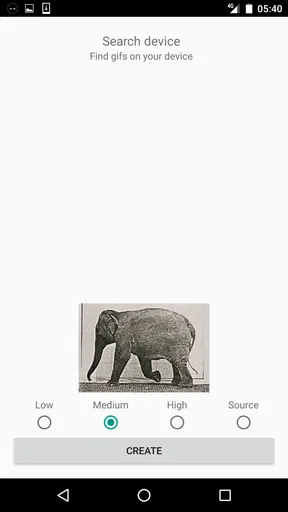
After installing GifWidget Pro, open the Android widget picker by pressing and holding an empty area of your home screen, then choose the GifWidget Pro widget. Depending on the launcher and Android version, you may be able to resize the widget after placing it. You can then select the desired GIF, preview it, and save the configuration before returning to the home screen.
Does GifWidget Pro affect battery life or phone performance?
Animated widgets can use more battery and system resources than ordinary static widgets, especially when several GIFs are playing continuously or when the animation contains many frames. On newer devices, the impact is usually manageable, but older or budget phones may show increased battery consumption or occasional launcher slowdowns. Limiting the number of widgets and using shorter animations can help.
Is GifWidget Pro compatible with every Android phone and launcher?
GifWidget Pro is intended for Android devices that support home-screen widgets, but the exact experience can vary between phones, Android versions, and launcher applications. Some manufacturers apply background or battery restrictions that may pause animations or prevent widgets from updating normally. If the widget does not appear, checking launcher permissions, restarting the device, or trying the default launcher may resolve the issue.
Are there any limitations or privacy concerns to consider before downloading?
Before installing GifWidget Pro, review its current Google Play listing for supported Android versions, permissions, pricing, and any in-app purchase requirements, since these details can change with updates. The app may require access to local media if you import your own GIFs. Avoid downloading modified APK files from unofficial websites, and verify the developer, permissions, and privacy policy before granting access to personal files.
